Monday, August 15, 2011

New Trends - The Cloud Platform and SQL Server

While discussing data trends in the marketplace and Microsoft’s corresponding initiatives to keep their products up-to-date in a recent class discussion, this is what I contributed to the conversation.
----------------------
The most important trend I see is the Cloud - platform creation, integration, management, and cross compatibility between systems and devices, hosted and supported by the World Wide Web.  Enabling this on their product offerings is a large step for Microsoft.  Microsoft has released various versions of SQL Server in an effort to remain competitive and to unify database connectivity between the varying devices and access methods used today, whether using a PC, Mac, Unix/Linux, or a mobile device.  Microsoft had a history of not playing well with others in their early years, however in the post dot-com boom era, and following 9/11, they realized that they needed to embrace (or buy outright) their competitors if they wanted to remain the dominant powerhouse they became, or at least begin healthy coopetition to unify the industry.  Releasing different, "lite" versions of SQL server not only enables home users and mobile users to have basic database functionality and connectivity, but also lends itself to cross platform development and use on compact devices like tablets, netbooks, and smartphones.  Further to that, being able to also connect these same systems and devices to Enterprise databases in the office further enables a companies most valuable asset (its workers) to generate and maintain business like never before, and keep the system updated in real time.  In 2011 the world is moving at a faster pace than ever anticipated and businesses are the cornerstone of this flux because they have to supply what consumers demand.  Being able to design, build, and administer a DBMS on the fly from any locale and on any device is extremely valuable to any business, especially medium to large sized business, because it allows them to better manage their data streams to generate revenue.  Additionally, making these various editions affordable (some being free) brings small businesses into the fold as well because they too can benefit greatly from the added capabilities and security of SQL Server within their smaller infrastructures.  Since a lot of Windows-based hosting providers already use SQL Server in their back office, allowing their customers to lease their hardware to create and manage their own databases is proving quite valuable.  The Cloud trend is directly related to cross platform creation, integration, and management in that the data made available in the Cloud is warehoused in RDBMS's that are maintained in large server farms and replicated across the globe.  With the increase in independent developers and programmers over the past few years, connecting to complex back office databases is, for the user, as easy as installing a new app on their devices in most cases.  The developers have taken responsibility to code the proper connectors within the program and the user needs only to enter server and login details to access the data, if the database is not integrated with the program itself.

What do you think?  

-Geek

Monday, April 4, 2011

How in the hell does Korea have 3x the bandwidth we do??? WTF!!!

In a recent class session, a classmate and I were engrossed in a discussion about broadband technologies and why the need for older connection methods such as dial-up are still required.  While there are many arguments about these topics, and even more opinions (f-bombs galor!), here's my 2-cents on what I see around the Inter-webs.

The main reason for US homes not having speeds like in Korea (over 30Mbps) today is the cost of the required optical infrastructure to support such systems to the house, however, that has been changing for years in many major cities and towns across our fine country.  Companies like Comcast and AT&T have been upgrading everything here in South Florida to optical fiber cables for at least the past 10 years.  Services like AT&T's U-verse and Comcast's Xfinity are providing speeds in excess of 20Mbps to the house, and popularity is spreading quickly among locals.  This is due to the Fiber To The Curb initiative started years ago which states that optical fiber cable is to be deployed within 1,000 feet of a home or business (http://goo.gl/OHRHc).  In many cases, as in my neighborhood, they are laying optical fiber cables under the main streets of newer housing developments and into sub-developments.  The US's average speed of just over 10mbps is up over the past number of years, you can see how everyone stacks up to the rest of the developed world here: http://www.netindex.com/download/allcountries/.


What most people do not know is that the optical connections between the data centers that make up the public Internet carry information at speeds in excess of 50Gbps around the globe.  Regardless of whether side of the fence you are one about the Internet's true available bandwidth being "unlimited," 50Gbps is something else. Comparing my super-fast 1.5mpbs connection to the US average of 10mpbs, and even Korea's whopping 34Mpbs+ to those speeds is borderline insulting.  With 4G rolling out nicely, users are already seeing speeds in excess of 12Mpbs to their mobile devices - almost 10x faster than what I run in my house.  And yet, the masses STILL complain about not having enough speed - heck, I complain too sometimes (I like my games damn it).

Someone else in the class asked why people still use dial-up in this high-speed era.  That is a simple answer, either they cannot afford broadband for whatever reason (more than likely this fantastic economic cycle we're experiencing), or their provider does not have the budget to implement the proper infrastructure to support broadband data transport in their area.  


I for one still use dial-up as a backup to my DSL connection when they have network outages.  While it seems foolish to even admit to using it, I still remember when it took 45 minutes to download a text based page on a remote server on a 300bps modem and how cool it was just to be able to communicate with another computer so many miles away.  We did not care how long it took to download things, it was just cool to be able to do it.  I have the same feeling with my mobile, handheld, and gaming devices today.  I play games and communicate with people on the other side of the world all the time, in real time, whenever I want to, through a piece of plastic and silicone, into a world that does not physically exist.  I just think that living that concept is cool, no matter how you get there.


What do you think?


-Geek


UPDATE 11/21/2011: Since changing to Comcast, my bandwidth now averages 50MBps down and 10MBps up.  With as expensive as DSL is for the low bandwidth, it seemed logical to change to Comcast because their prices are so low per megabit in comparison.  Do your research, services like still use DSL like AT&T's U-Verse while enticing has a lot of service issues in my area.  Most of the people I talk to regret every signing up for the service even though it offers increased speeds over standard DSL.  Hit me up if you want more details.

Sunday, February 13, 2011

Tablet PC's - Does the iPad really have competition?

(see the end of the article for updates)


I am a tablet junkie...here's my 2 cents on what's what for 2011.

The iPad/iPad2 are a glorified iPhone. Cool toy but that's about where it ends in my opinion.

If you are looking for a good tablet 'computer,' starting at the small form factor (and my personal favorite) you have the Samsung Galaxy Tab available on all networks. The best in show at the CES2011 was the Motorla Xoom which will give the Galaxy Tab some competition but only on the Verizon network. Also available in a small form factor is the Dell Streak exclusively from T-Mobile, the AOC Breeze (9"), Acer's Iconia Tab 4.8" & 7", ASUS Eee Pad Slider with Nvidia's Tegra 2, the ASUS Eee Pad MeMO (7"), the BlackBerry Playbook, and the Lenvov Slate (running a custom skinned Windows 7 OS).

Larger form factors include the ASUS Eee Pad Slate EP121 runs Windows 7 Home Premium and an Intel core i5 processor. Also you have the Motion CL900 running Windows 7, and Toshiba has a Tablet yet to be named that will be coming out sometime this year running Honeycomb. 

There are a bunch of other tablets coming out this year, most of them running Android Honeycomb (3.0), or at least Froyo (2.2), and a hand full of Windows 7 tablets. The general consensus from field testers is that Honeycomb will be the OS to beat on the tablet format and Window 7 has a long way to go still with its touch interface. 

Making a run at the touchscreen market once again is Palm, the pioneer of the PDA and the first true Smartphone. With their new webOS powered devices and partners like HP, they have some really good entries into the marketplace. Check them out in all their NEW glory here: http://www.palm.com/us/products/pads/touchpad/index.html

You can check out a slide show of some of the hottest ones from CES starting here: http://computershopper.com/slideshow/ces-2011/tablets-at-a-glance/aoc-breeze


Are you running one of this years hot tablets? What do you think?


-Geek


UPDATE 3/30/2011: I am excited to add to this post that Samsung announced that it will be releasing the successor to the Galaxy Tab on June 8th.  It will come in two flavors, the Tab 8.9 & the Tab 10.1 - both are powered with the latest dual core 1GHz Nvidia Tegra 2 Processors, Android Honeycomb (3.0), Dual Cameras, 1080p HD Video Playback, Flash support and a price that Apple is cringing about - the Tab 10.1 will have two flavors 16GB for $499 and 32GB for $599.  The Tab 8.9 will debut at $469 for 16GB model and $569 for the 32GB model.  The iPad 2 starts at $499 as well for the 16GB model, but that does not include 3G service and comes with a lower standard resolution as well.  


For details on the new Samsung Tab 8.9 & 10.1, visit a great review done by engadget http://goo.gl/eEM8J


To see how the iPad 2 stacks up, you can see those details on Apple's site here http://goo.gl/K5zWt

UPDATE 8/15/2011: I have owned the Samsung Galaxy Tab 10.1 since its release and let me tell you this thing can fly!  It lives up to every expectation.  I highly recommend you test one out yourself.


UPDATE 10/28/2011: HP Stopped producing their TouchPad due to stiff competition from Apple.  It may be resurrected in the future with a different brand and possibly the Android OS but that remains to be seen as of this writing.

Monday, November 15, 2010

Can Software Keep up With Today's Hardware? Maybe...maybe not...

I just reread an article in Redmond Magazine recently that said that developers are reacting to hardware evolution instead of driving hardware innovations like they used to.  I have also read that at one time hardware developers felt held back by software developers because their applications were not ready for the leaps in power.  What I recently learned from my professor is that software developers did not yet understand how to upgrade their code to better utilize this new power, and still don't in a lot of ways.  The hardware developers finally decided to continue innovating, with or without the software guys.  The thinking was that someone, somewhere would have to make the software to work with the new hardware.  The open-source community has been part of parallel programming initiatives since the beginning so there was no issues there.  The biggest issue, was with Microsoft who exists in 90% of the worlds computers.  They did and still do well on single threaded applications but, until Windows 7, struggled with efficient and effective multi-thread execution at the desktop.  Microsoft's server software has been multi-threaded for some time now, and they have continued to improve on that as technology advances.  What I see happening in the past few years at a hurried pace is developers coding in parallel languages for 64-bit multi-core architectures and creating ways to code for 128/256-bit many-core architectures, as already found in modern video cards, for the desktop.  CPUs with 80 and 100 cores already exist, for servers, now developers need to catch up to bring this power to users.

I found an article online that talks about a company that released a 100-core processor to compete with Intel and AMD at the server level, here's some information on the technology and its intended use: http://www.tilera.com/products/processors/TILE-Gx_Family


What do you think is holding development back now?  Is it just that developers need to catch up, or is it too little too late?


-Geek

Monday, October 18, 2010

iOS4.1 Jailbroken for life on all iDevices


The Chronic-Dev team released Greenposi0n to the world on October 12 with support initially only for iOS 4th gen devices (iPhone 4, iPod Touch 4G, iPad) but now (as of posting) you can jailbreak the iPod Touch 3G/2G (both MC and non-MC models) with the same tool - something Limera1n will not do.  I just performed the JB on my own iPod Touch 2G (non-MC model) and it ran just fine.  I do recommend you download the software directly from http://www.greenpois0n.com and not any other site or mirror.  I tried downloading it through a RedmondPie.com mirror but it did not work for me at all.  Anyway, I'm back to being Jailbroken and boy does it feel great!


Note: Limera1n supports all 4th Generation iDevices, as well as the iPod Touch 3G and iPad 3.2.2+.  I can confirm that this works on the 3GS without problem and the so-called lag is not noticeable to the untrained eye.  There are no announced plans to support earlier iDevices as of this posting.


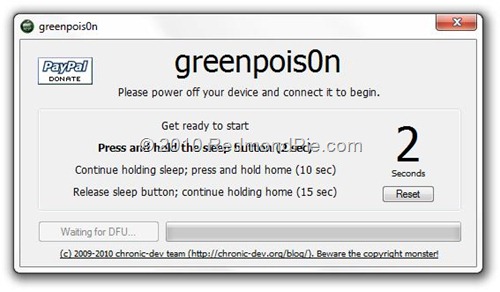
Here's the Greenpois0n step by step for you guys, screenshots provided by redmondpie.com, enjoy!


Be ready to move quickly, some of these steps will pass you by if you aren't ready for them.  It is okay if you mess up a few times, forcing a hard reboot will allow you to start the process over again (to do this simply press and hold both the sleep button and home button until the device shuts off completely, then press the sleep button to power on, and restart the process).  This works, and does not delete your stuff, I am living proof.


Step 1:  Download Greenpois0n from here: http://www.greenpois0n.com
Step 2:  Connect your iDevice to your computer via USB, power it off (shut down) and click on "Prepare to Jailbreak (DFU)"
Step 3:  Following the on-screen instrcutions:
  • Press and hold the sleep button for 2 seconds

  • Continue holding sleep; press and hold home for 10 seconds.


  • Release sleep button; continue holding home for 15 seconds.


  • Step 4: Your device is now ready for jailbreak. WHILE HOLDING ONTO THE HOME BUTTON Click on “Jailbreak” to inject the exploit.  IMPORTANT: DO NOT LET GO OF THE HOME BUTTON AT THIS POINT

  • Step 5:  Your iPhone, iPad or iPod touch should now be successfully jailbroken on iOS 4.1 !  
    • DO NOT LET GO OF THE HOME BUTTON YET doing so will cause the process to fail and you will need to hard reset and start over


  • Once you see the above screen, with the "Quit" button and "Jailbreak Complete!" shown, you can let go of the home button


  • Step 6: Once your device reboots, make sure you are connected to the Internet and start “Loader” found on the homescreen (look on your last screen if you have multiple screens) and install Cydia (only thing in there).  Note: "Loader" may appear to be whited out on your home screen, this is okay, continue as noted here to install Cydia.


Once Cydia is installed it will ask you if you want to remove loader, select continue and after restart go into Cydia.  Make sure you select "Complete Update" when prompted in Cydia so everything works right.


This is it! You are done!


You will see what looks like a bunch of lines of code flash on your screen, pause for a few moments, and then your device will come up to your lock screen.  This happens immediately following the jailbreak process and is normal.


Once you get Cydia installed, after the initial "Complete Update," there will be a lot of updates it requires, make sure you keep going back into the "Changes" section of Cydia so you get all the updates.


For you Rock users, Cydia and Rock are now one.  Everything is done through Cydia.  According to their own FAQ's, you simply need to download/purchase something from the Cydia store, create a Cydia account and your Rock licenses should transfer.  Don't hold me to that, I have yet to see it work right on  any device.  The backup feature from Rock is not integrated with Cydia...yet...they say it is in the works.


Unlock for iOS 4.1 (Old Baseband) There is currently no way to unlock your iPhone on the latest 05.14.02 / 2.10.04 basebands. If you have managed to preserve your baseband while upgrading to iOS 4.1 using TinyUmbrella, you can use the existing version of Ultrasn0w to unlock your iPhone on iOS 4.1. Step by step instructions for unlocking can be found here.


Feel free to post questions here and I will respond in kind.


Enjoy!


-Geek


UPDATE 08-NOV-2010: I have been using this JB on my iPod Touch 2G since its release and it functions, however, because of the inferior hardware of my second generation device, I am limited as to which programs & themes will run correctly, if at all.  As such, when jailbreaking an older device (earlier than 3G, except for iPad) be wary of what you install in regards to themes and newer apps.  The 1G & 2G devices simply do not have enough power, which is why multi tasking is disabled on them by default from Apple with iOS4.  If you can, keep your 1G & 2G devices running iOS <4.0.1 and use http://jailbreakme.com to jailbreak the device, it will run much better. - Geek


UPDATE 06-JULY-2011: @Comex just released Jailbreakme. 3.0 for all iOS devices <4.3.3...go to http://jailbreakme.com now to JB your iOS device for life!

Monday, September 27, 2010

Automated Systems: Will Human Interaction go the way of the Dodo?

Recently, a classmate of mine posed the following statement;
"Do you see automated systems advancing in the near future to save developers more money? I understand that most times there needs to be human to human contact, but there has to be some way to take this to the next level. Software applications are replacing ATM's for crying out loud! I see this as another threat to humans' jobs though. I guess you just have to work in the right field." ~Jermaine Edwards


Here's some of my thoughts on the subject - what do you think?
----------------------------------------------------------------------------
Eventually intuitive systems will replace most human to human interaction in the short term, making developers wallets fatter and our lives simpler. Programs will continue to get more complex as the demands of users change and technology advances.  The drawback is reduction in jobs, as was experienced during the first industrial revolution when mass production changed the way everything was done, and who was no longer needed on the manufacturing floor.  As you mentioned, ATM's are being replaced with iPhone apps.  Eventually, I think bank branches will be replaced by full-service, online, interactive banking.  We have robots that build our vehicles - one robot can do the work of 100 men in far less time; robots that perpetually clean our floors and recharge themselves when necessary; planes that can fly themselves around the world without pilot interference, etc..  I think beyond our lifetimes is when true artificial intelligence will be born, like we see in movies today.  Only then do I think will human interaction become obsolete because it will not longer be necessary - an intelligent machine in our life will perform many, if not all, of the functions we perform today, leaving little left for the human to do except system maintenance and maintain physical relationships as desired.  That may be an extreme example, but one that I think has a real chance of eventually becoming reality with the way technology is advancing.  It is a trickle down effect - a new advancement causes a common product to become obsolete which leaves manufacturers without a product to make, distributors without a product to sell, and service providers without a means to an end.  The consumer enjoys the benefit of a great product delivered quicker than ever, but the supply chain dwindles to a computer server and a delivery truck.  This is a profitable arrangement for the manufacturers but leaves everyone that was in the middle stuck to reinvent themselves or close their doors.

There is also another side to this - the green effect, meaning that the reduction in effect on the environment and the effect that has on job availability. As technology advances, so too do the materials they are manufactured from.  Most machines and consumables can be recycled today, or are biodegradable and non-toxic.  Also, the increase in use of Internet based storage and collaboration has significantly reduced the amount of paper output, as well as reduced the quantity of laser toner/ink cartridges used, which further reduces the environmental impact.  This affects the job market as well, automation has a long history of leaving people/industries jobless, such as when mass production was introduced in the early 20th Century and a lot of factory workers were replaced with machines.  As technology advances we invent or refine machines to help us in our endeavors, initially as tools to enhance an experience or quicken a solution.  Now, machines are seen as a necessity of life - for many to keep up with an ever evolving world, for others just to keep track of their daily lives.  Whatever it is used for, humans are more dependant on machines and technology now than we every have been.  Unfortunately, I think a dose of laziness is driving a lot of today's innovations, leaving consumers to sit on their couches, at their desks, or in their cars doing whatever they want, whenever they want. 

As far as working in the right field, IT seems to be a big fit now and in the future.  We must be mindful not to loose control though, what if god forbid every electronic system on the planet went dead and we all had to go back to doing it manually.  Since business has married to technology for a while now, how many companies, and individuals for that matter, do you think could really survive in an old-fashioned world?  My guess, a lot less than any of us think.


Tell me what you think, post a comment below.


-Geek

Back to Spam

Back to Spam

Most companies make use of some type of Spam and Virus Protection which does a remarkable job of neutralizing unsolicited and detrimental messages, so how is it that spam still exists and thrives to wreak havoc? Below are some of the five most common pitfalls that allow spam to continue, and what you can do about it:

Zombie Workstations
Either via an inbound spam message that was missed, a website exploiting a bug in a browser, or an infected file being transported onto your network by a user, workstations are very prone to being infected with malicious code in the form of a virus, malware, trojan, or the like. The source can be complicated to cure, but there's a very simple fix to save the rest of us from those machines sending us spam, and getting your public IP Blacklisted to boot.

Simply configure an outbound firewall rule to only allow outbound connections on port 25 from your in-house mail server. If you don't have a mail server, then your network shouldn't need to make outbound connections on port 25 (or inbound ones for that matter). You may need to reconfigure some Email clients who are using port 25 to connect to their SMTP server, but most servers these days have the ability to leave port 587 open for this type of connection.

By shutting down your local network from creating outbound 25 traffic, you are removing the ability for your workstations to generate a message and deliver it without going through your gateway which you as a good sys-admin monitor and control.

Servers Acting as Open Relays
The next largest source of unintentional spam are misconfigured servers or servers with accounts that have weak passwords. By not having authentication configured correctly you can allow connections from the outside to use your server to send mail. Spammers will just troll IP addresses looking for Open Relays and exploit any hole that is left open for them to use your server to send their spam. Additionally they can find the home server for an email account and attempt to authenticate as that user with a "brute force" password attack. However brute is not a fitting adjective when you let your users set up their account with their password set to "password" or "1234" or the like.

At the very least, we recommend having a good firewall in front of your mail server to look for these types of attacks. Ideally you would have either an Edge MTA which acts as a perimeter for your main mail server or employ a cloud based solution so that you can block incoming traffic against your mail server from anybody but that trusted source which has very high levels of security in place.

Clever Trickery
Spammers are tricky devils and they learn and adapt to email defense systems to break those systems or to circumvent them. One example that demonstrates the type of adaptability that Email Security professionals have to deal with is Backscatter spam. As an operator of a legitimate email server, one of the things your server does to be helpful to other servers is generate email containg error messages when messages encounter problems. For example if somebody sends you an email to an address that doesn't exist, it is helpful for your server to send the original sender a notification Non-Delivery Report (NDR) to let them know that their message wasn't delivered.

Spammers can make use of this feature in the following way: They create a message and forge the From: field to contain the email address of their intended target. Then they send this message to an email address they know doesn't exist on your server in your domain. Your server kindly sends back a notification to the person it thought sent the message. In fact you just delivered the message for the spammer from your server and IP address which they most likely trust. This type of spam is difficult to detect and block because it is technically an illegitimate notification. 
The solution to eradicate this type of spam is to perform the test to see if the user exists during the SMTP conversation. By doing that, your server is never actually accepting the message from the sender and therefore need not generate a notification message. The sending server with a legitimate message for a non-existent address is then responsible for notifying it's own user of the failure.

Malware, Trojans & Viruses
These three words strike fear into all system administrators. You know that if your workstations become infected with malware, a trojan or a virus you have hours of work ahead of you identifying and eradicating the source.

Malware spreads spam by infecting a computer by secretly accessing a computer system without the owner's informed consent. The infection can spread through several sources including computer viruses, worms, trojan horses, spyware, dishonest adware, crimeware, most rootkits, and other malicious and unwanted software. In the end you are left with a barely working machine that could be blasting out spam and spreading the infection further.

Trojans are malware that appear to perform a desirable function for the user prior to run or install but instead facilitates unauthorized access of the user's computer system. It is a harmful piece of software that looks legitimate. Users are typically tricked into loading and executing it on their systems. Once executed machines are often turned into zombie bots that send out spam.

Viruses are computer programs that can copy themselves and infect computers. A virus can spread from one computer to another (in some form of executable code) when its host is taken to the target computer; for instance because a user sent it over a network or the Internet, or carried it on a removable medium such as a floppy disk, CD, DVD, or USB drive.

New Spam Tactics
Filter providers continue to hone their techniques in this constant game of cat and mouse. The latest trend is a shift to email worms. "The worm arrives via emails with the subject line 'Here You Have' or something similar, and the messages contain a link to a site that will download a malicious file to the victim's PC. The malware then drops itself into the Windows directory with a file name of CSRSS.EXE, which is identical to a legitimate Windows file." (Slashdot)

Wrap up
A few years ago the worse spam you saw was "image spam", this type of spam tricked the filters because it was a .jpg or .gif file that was at that time allowed by most servers as a non-threat. However, each day spam is evolving to become more aggressive and preys on your unassuming users. As well, many sources of online threats have shifted their attention from launching attacks through email systems and have targeted web browsers as an often unguarded entryway into a network. To combat all of these threats, it is highly recommended to include a Business Perimeter Security Solution in combination with Web Filtering.